I said I would go back in history for the early setup. Here is the first part.
About two months ago, I called my friend Eric Lynn at AMD.
I had convinced myself that I needed to run AI locally. Some of that was data sovereignty. Some was privacy. Some was wanting to experiment without paying a company every time I generated a token. Some of it was simply because it is damn cool tech. It brings me back to the old 2400 baud days when it was the Wild West and advancements were made daily. If you have noticed my terminal colors in previous posts, I still yearn for those days a bit.
Tech became sanitized. It was runbooks, best practices, and MOPs. Compute and memory became plentiful, and the answer was more cores and more memory instead of actually addressing the problem. If one good thing comes out of RAMpocalypse, optimization might be back in fashion. New and interesting ways to get the most out of what is there. The memory market will not recover until maybe 2028. CPU pressure is becoming a problem as well. I looked at upgrading to a PCIe 5 architecture with DDR5, but 128 GB of meh-brand RAM is ~$5,500 at the time of this writing. My customers have sticker shock as prices rise every week.
Anyway, I already understood NVIDIA’s options. I also understood what NVIDIA charged for them, and I had decided that I was absolutely not spending an insane amount of money on one of the new RTX PRO cards.
That sentence aged well. Less than a month later, I owned a roughly $12,000 RTX PRO 6000 Blackwell. Used-car money on a GPU…or at least I assume so, as I have never had a license to drive a car. I do have motorcycle and boating licenses. You can see the pattern of how I just might be a bit of an odd human.
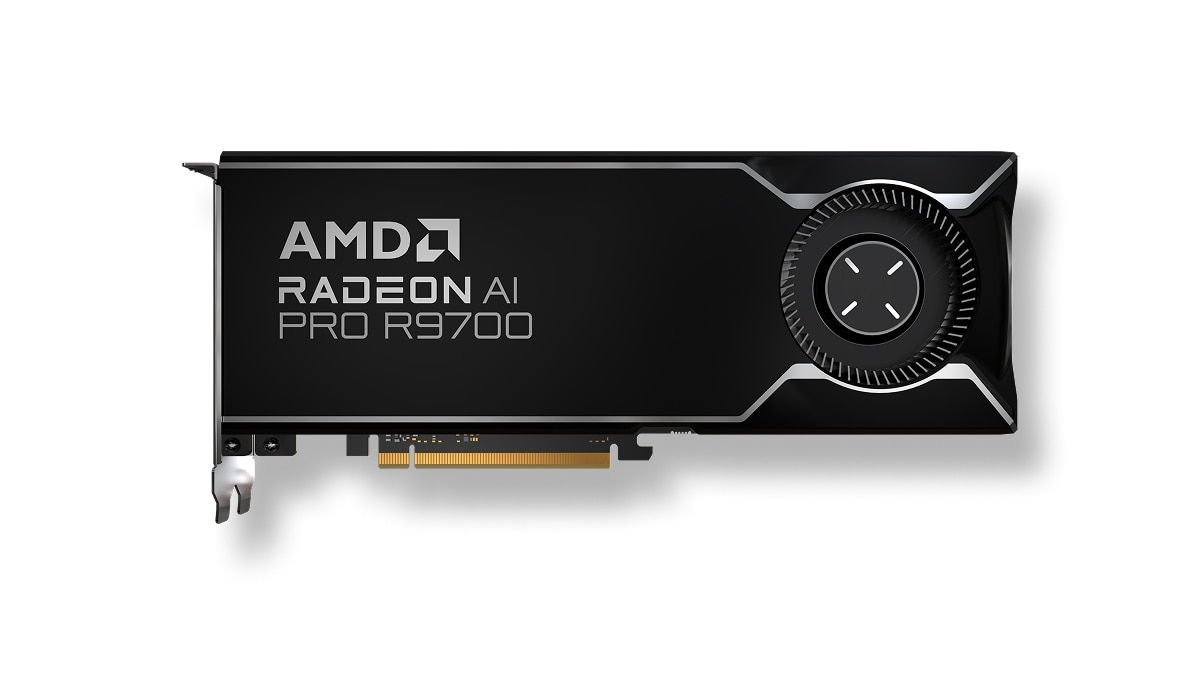
At the time, however, Eric told me about AMD’s new Radeon AI PRO R9700. It had 32 GB of VRAM, 640 GB/s of memory bandwidth, a simple two-slot blower design, and a retail price around $1,350.
For local inference, it looked fantastic.
There was one slight complication. About five hours before I talked to Eric, I had ordered a used RTX 3090 for my Alienware. The 12 GB RTX 3080 Ti in it was no longer enough for what I wanted to run, and I figured I could sell it and recoup some money. I wound up giving it to a friend who wanted to game and couldn’t afford to upgrade their old GPU.
That meant I went from planning to replace one GPU to buying two GPUs in the same afternoon and not selling the 3080 Ti.
I went to Amazon to order the R9700. One manufacturer’s card sold out while I was trying to buy it, so I ordered the other one. It arrived overnight.
While recording this story, I said June 4. ChatGPT nicely corrected me by saying it was June 3rd that I installed the card. He likes to nitpick. Nobody cares. This is the two-month mark.
The plan lasted until I installed the card
The R9700 was supposed to replace the NVIDIA A4000 already in my server.
This was going to be wonderfully efficient. The R9700 would handle local inference and the media workloads already running on the machine. Those media jobs only needed a few gigabytes of memory, leaving most of the 32 GB available for AI.
I could then sell the A4000, which was somehow worth more used than I had paid for it several years earlier. Clearly this all made great financial sense. ~$400 net spend for double the VRAM, a modern chipset, and much more efficient media engines.
One card in. One card out. Simple.
Of course it did not work that way. The AI gods want me poor.
The media-transcoding software I use officially supports Intel and NVIDIA. It also has unofficial AMD support, and the necessary libraries appeared to be present.
They were just too old to support RDNA 4.
This was not really AMD’s fault. The application depended on a downstream integration that had not caught up with the new hardware. It did, however, demonstrate how thoroughly NVIDIA owns certain parts of the surrounding software ecosystem.
I spent about eight hours digging through libraries, versions, and code paths before I understood the problem. In theory, I could have ripped the integration apart and rebuilt it myself.
Then I remembered that I had not seriously written code since the mid-1990s.
That was thirty years ago.
No wonder my back hurts.
Even if I managed to fix it, I would become the unpaid maintainer of someone else’s unofficial hardware integration. Every meaningful application update could require me to merge, rebuild, and hope nothing else changed.
No. I already have a job.
The A4000 went back into the server.
That improvised compromise actually worked well. The A4000 handled media transcoding and eventually some smaller sidecar workloads. The R9700 handled the main language model.
Sometimes architecture is the result of careful planning. Sometimes an application refuses to recognize your new GPU, so you put the old one back in.
The AMD problem that never happened
Before buying the R9700, I had heard all the usual warnings about AMD on Linux.
The drivers are difficult. ROCm is difficult. Hardware support is inconsistent. You need a special kernel, strange modules, or some collection of command-line rituals passed down between increasingly exhausted Reddit users.
None of that happened.
I installed ROCm. I compiled llama.cpp with ROCm support. It recognized the card and ran the model.
That was it.
No custom kernel. No special out-of-tree kernel-module science project. No days spent trying to convince Linux that a GPU was, in fact, a GPU.
For inference, the only part of this entire project that truly worked the first time was the AMD card.
That is worth emphasizing because the reputation has not caught up with the experience. AMD just worked.
The only material compatibility problem I encountered involved one specific media application with unofficial AMD support. Most people buying this card for local AI would never encounter it.
Why I started with llama.cpp
If you are beginning with local inference, I still think llama.cpp is the correct place to start.
It is largely self-contained, it runs almost everywhere, and it does not begin by asking you to assemble a tower of Python dependencies that all expect slightly different versions of one another.
Apparently, during the years when I was not paying attention, everyone lost their minds about backward compatibility.
Do not even get me started on making a programming language sensitive to whitespace. Curly brackets are fine. You can see them. I do not know what happened to these people as children that made them do this to themselves.
YAML may be worse. YAML is the single worst configuration format that has ever happened to me, but that story belongs in the future LibreChat article.
With llama.cpp, I could compile the runtime for my hardware, download a GGUF model from Hugging Face, and point the server at it.
The models come in different quantizations, with names such as Q4, Q6, and Q8. Quantization reduces the size of the model so it can fit into a practical amount of memory.
For personal inference, Q8 is generally considered effectively identical to full quality. Yes, information is technically removed. That does not mean the difference remains perceptible or useful.
Imagine a television with a 24K resolution. You could reduce that resolution and technically discard information, but the human eye could not resolve the missing detail anyway. For the person looking at the screen, nothing was lost.
Q6 is also generally very good. Q4 is popular because it lets people run much larger models on smaller hardware, but quality can vary by model and how the quant was done. This directly feeds into the “where is the problem?” theme.
Then there are the r/LocalLLaMA lunatics who run models at absurdly low quantizations just to prove they can do it. They will load whatever enormous model was released that week, generate one token every three minutes, and proudly announce that it runs locally.
Technically, it does. Type a question Monday morning and you may have an answer by Friday.
llama.cpp can also place some model layers in system RAM when the entire model will not fit in VRAM. That is extremely useful for normal people. It costs performance, but it lets much larger models run on affordable hardware.
It was less useful for me because I have issues.
I did not want to wait, and I did not want another variable. If a model behaved badly, I wanted to know whether the problem was the model, the prompt, the runtime, the interface, or me. Aggressive quantization and CPU offloading added two more things to blame.
At the beginning, I tried to keep models fully inside the R9700’s 32 GB and generally chose Q6 or Q8 if it fit and left room for context.
That still left plenty of ways for me to break things.
Then Reddit made me suspicious
For roughly the first week, I used ROCm exclusively.
It worked, but I started seeing people on Reddit report substantially better llama.cpp performance from the same class of hardware.
That created a familiar local-inference problem: I knew something was slower, but I did not know why.
Was it ROCm? The model? My build flags? Context length? The version of llama.cpp? Some obscure environment variable? Were the people on Reddit comparing completely different workloads and leaving out all the information necessary to reproduce them?
The answer to the last question is usually yes, but their numbers were still too different to ignore.
So, I built llama.cpp again, this time with Vulkan.
This is another reason llama.cpp is such a useful starting point. I could test a different hardware backend without changing the model or rebuilding the rest of my system.
Vulkan was faster
Vulkan is the vendor-neutral path. ROCm is AMD’s native compute platform.
Naturally, I expected ROCm to be faster.
It was not.
My first documented comparisons appeared on June 16. Using the same Huihui Qwen3.6 27B MTP Q6_K model, Vulkan was approximately 30 to 34 percent faster at ingesting prompts. Its generation advantage ranged from essentially nothing on the longer test to about 7 percent on the shorter one.
Those tests were operational comparisons, not a laboratory-perfect A/B. The recorded runtime flags were not completely identical.
The pattern was still obvious.
A few days later, I produced the cleanest early same-model comparison:
| Backend | Prompt ingestion | Token generation |
|---|---|---|
| Vulkan | 636.65 tok/s | 27.40 tok/s |
| Tuned ROCm build | 366.68 tok/s | 20.75 tok/s |
| Vulkan advantage | 74% | 32% |
Vulkan was 74 percent faster at reading the prompt and 32 percent faster at generating the answer.
That was not a rounding error.
ROCm had installed easily. It ran correctly. I had even built a tuned performance version.
Then the vendor-neutral backend rolled up like Pootie Tang holding his belt.
That was slightly embarrassing for AMD.
After those tests, Vulkan became my primary backend on the R9700.
I have since heard that ROCm performance on the card has improved materially. AMD has been moving quickly. These numbers describe my machine while ROCm was still evolving. They are not a claim that Vulkan will beat every future ROCm release forever. Also, RDNA 4 is a consumer architecture at a price point. It makes sense that AMD is focusing on its newer CDNA 5 architecture for enterprise and rack-scale. More on that later.
This is the evidence that you should test rather than assume the vendor-native path must be faster.
While on the topic of support for specific architectures, I have a bone to pick with NVIDIA. I find it much more egregious that NVIDIA takes the same approach with the RTX PRO 6000. The RTX PRO 6000 and the RTX 50-series cards use the same SM120 architecture, affectionately called “consumer Blackwell.” Feature support for SM120 is either delayed or not there. I currently run custom community-made SM120 kernels and had to rip apart SGLang one night to get that working with acceleration (future story called Shots and SGLang…whiskey gave me the bravado to rip apart a leading serving platform). The RTX PRO 6000 is also what MSOs and telecom operators are using for edge inference in four- or eight-GPU systems. It is the cornerstone of AI Grid. To be fair, I have seen significant improvements in SM120 support in the past six weeks, and, at the time, I didn’t even think of offering my SGLang work upstream. Three weeks later, when I went to submit it, someone else had already done the same work.
One last note about CUDA. CUDA’s ecosystem is VAST. Everything you can imagine is out there somewhere. That is the benefit of being the leader that everyone uses at scale. However, that scale also makes the ecosystem a bit disjointed. You will 100% run into a version compatibility errors. You need PyTorch version X with NVCC version Y only. This is not really an NVIDIA issue. Some of it is caused by my favorite language, Python, and some of it is just so many contributors doing their own thing.
I recommend the card I returned
I still recommend the R9700 without hesitation.
I realize that is a strange thing to say because I returned mine before the end of June and replaced it with an RTX PRO 6000.
That was not because the R9700 failed. It was because Eric was correct about the audience and I was apparently not part of it.
For 99 percent of people running local AI, 32 GB of VRAM is a huge amount. The R9700 is fast, compact, reasonably priced, supported by both ROCm and Vulkan, and remarkably undramatic to install.
I kept escalating because I always need the best. This has followed my usual path for everything. I make the sane purchase, have FOMO, and wind up buying best in class and losing money on the original purchase. In this case, I wanted larger models. Then I wanted higher-quality versions of those models. Then I wanted more context. Then I wanted speculative decoding, correction weights, vision, and enough spare memory that enabling one feature did not force me to remove another.
At the end of May, I told myself I would not spend an insane amount of money on an RTX PRO.
By the end of June, there was a 96 GB RTX PRO 6000 in the server. I wish I bought 2.
The R9700 was the sensible purchase. What happened afterward says more about me than it does about the card.
AMD has also continued pushing forward across its AI portfolio. In July, the company formally launched Helios, its open rack-scale platform for large frontier-model training and inference.
Shameless plug: HPE is a major Helios partner. If you need an entire rack instead of one $1,350 GPU, you know where to find me.
That concludes the business portion of this article.
The model that could not see
Backend performance was not the only thing I misunderstood during those first weeks.
One of the practical work uses I had imagined was taking a photograph of a customer whiteboard and asking the model to turn it into an editable draw.io diagram.
This was part of the same mental gymnastics I had used to justify the hardware purchase. If it could save me from manually recreating a whiteboard after every architecture session, the entire project was clearly a responsible professional investment.
I uploaded a whiteboard image in my user plane and asked the model to create a diagram.
It could not see anything.
The model claimed to support vision. llama.cpp was serving the model. The chat surface accepted the attachment. I had no idea which component had failed.
So, I put on my engineering hat and designed a workaround.
My Google account gave me access to one of its Flash vision APIs. I could send the image to Google, collect a description, and then pass that description into the local model.
It sounded like a small middleware shim.
Anyone who has worked in enterprise technology knows where this is going.
It is never just a shim.
Middleware always sounds like the easy answer. Then the integrations change, the technical debt accumulates, and eventually you are looking toward the Ben Franklin Bridge wondering whether jumping is better than maintaining it.
Obviously, I fired up ChatGPT and built the middleware.
After doing the work and multiple engineering tests, I thought it was time to fire up the UI and give it a go. The first request worked perfectly. The image went to Google, the description came back, and the local model could use it.
The second request failed.
The third request failed.
The fourth request failed.
Of course they did.
I spent hours inspecting the code, changing requests, checking authentication, and trying to determine what I had broken.
The API access was described as free and effectively unlimited, but it was also rate-limited in a way that was not clearly published and apparently varied by day. During my testing, the limit was twenty requests.
I had already used all twenty while developing the middleware.
The solution was to try again tomorrow.
I do not take that kind of answer well.
After more sleepless hours, I finally discovered the actual problem with the local model.
I forgot to download its eyes
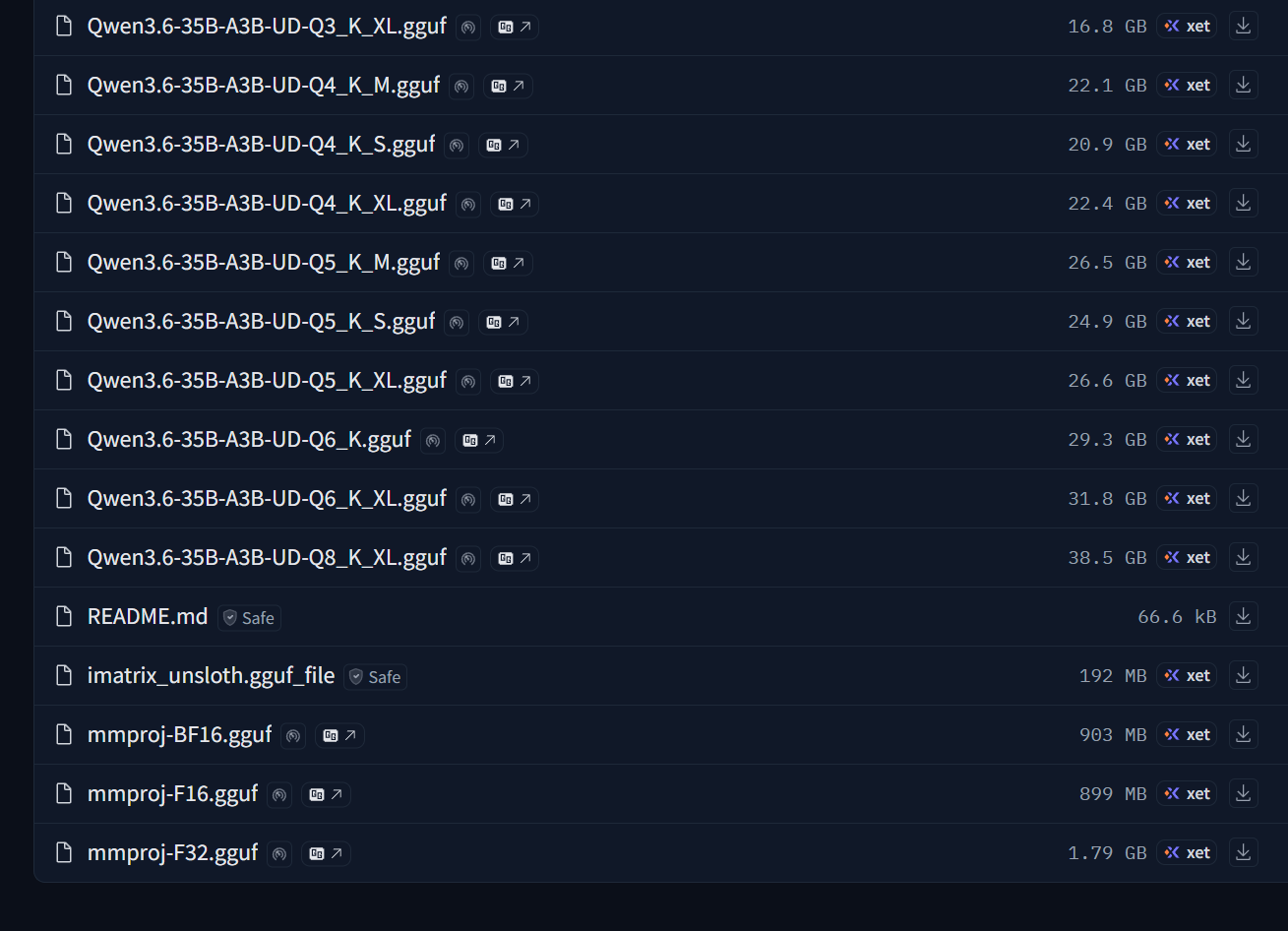
The main model lived in a GGUF file.
Vision requires a second file called mmproj.
In normal-person terms, the mmproj is the part that
gives the model vision. Without it, you have downloaded the brain but
left its eyes sitting in the Hugging Face repository.
The slightly more technical explanation is that the file connects the image encoder to the language model. Normal people do not need to know that to get started. They need to know this:
If the model supports vision, download the mmproj and
include it in the configuration.
I had not done that.
I was annoyed with the Hugging Face download command, so instead of downloading the complete model repository, I clicked the main GGUF file and downloaded it manually.
The mmproj was sitting right beside it.
Shortcuts have a remarkable habit of coming around to bite you in the tuchus.
I added one line to the llama.cpp configuration, restarted it, and the local model could see.
The Google middleware was unnecessary. The quota investigation was unnecessary. Nearly everything I had done was unnecessary.
One file. One configuration line. Boom. It worked. So…yeah… The problem was me.
The hardest problem was attribution
ROCm was easy. Vulkan was easy. Compiling llama.cpp was easy.
Understanding why something did not work was hard.
When vision failed, nothing displayed a helpful message saying:
John, you forgot to download the model’s eyes.
It simply did not work.
That uncertainty shaped the next two months.
I used higher-quality quantizations to remove one possible source of failure. I tried to keep models in VRAM because CPU offloading added another performance variable. I built separate runtime versions so I could compare backends. I started recording exact configurations because I could no longer trust myself to remember which experimental change produced which result.
The AMD card was never the difficult part.
It arrived overnight. ROCm worked. Vulkan worked faster. One media application refused to support it. I put a second GPU back into the server. Then I built an entire middleware service because I had forgotten to download one file.
In the next article, I will get into the user plane…the chat surfaces, the supporting pieces they needed, and all the debacles that came with trying to find one I could actually live with (I still haven’t!)